3. Project Management
This chapter presents the project management approach adopted for the development of Screen2Green. Since the project combines hardware development, software integration, user interaction, and academic reporting within a limited timeframe, it required a management strategy capable of balancing structure with flexibility.
To address this, the team adopted a hybrid project management approach combining elements of Scrum and Waterfall. Waterfall was useful for planning around fixed academic deadlines and mandatory deliverables established by the European Project Semester (EPS) programme, while Scrum supported iterative development, continuous feedback, and adaptation to technical and organizational challenges throughout the semester. This combination was considered appropriate because the project contains both predictable elements, such as milestone submissions, and uncertain elements, such as concept refinement, prototype development, and system integration.
The chapter is organized into the main areas relevant to project management: scope, time, cost, quality, people and stakeholder management, communication, risk, procurement, and project plan. Together, these sections explain how the team structured the work, allocated responsibilities, monitored progress, and responded to challenges during the project.
3.1 Scope
The scope of the project defines both the product to be developed and the work required to deliver it. In the case of Screen2Green, the main goal is to design and develop a functional prototype of a pot system that links smartphone screen-time behavior to the condition of a living basil plant.
3.1.1 Product scope
From a product perspective, the scope includes the development of a compact indoor plant-growing system capable of supporting basil cultivation in a small residential environment. The system is intended to include a physical pot structure, a water reservoir, an automated irrigation mechanism, a microcontroller-based control system, and a mobile application that communicates relevant information to the user. The core concept of the product is that excessive screen-time affects the watering conditions of the plant, thereby creating a physical and biological feedback loop. The prototype is expected to demonstrate the feasibility of this concept rather than function as a market-ready consumer product.
3.1.2 Project scope
From a project perspective, the scope includes all activities necessary to research, design, develop, and document the prototype, as shown in Figure 1, which presents the Work Breakdown Structure (WBS) for the project. This involves background research on indoor herb cultivation, hydroponics, smartphone usage and mental health. It also includes concept development, selection of materials and electrical components, hardware assembly, software integration, system testing, and evaluation. In addition, the scope covers the production of all required academic deliverables, including the written report, presentations, poster, flyer, and supporting documentation. These activities are structured through the WBS, which organizes the project into manageable components [1].

3.1.3 Scope limitations and constraints
The scope of the project is intentionally limited in order to ensure feasibility within the constraints of a single academic semester. The project does not include the development of a market-ready product, large-scale production, or a fully featured mobile application. Advanced features such as long-term plant monitoring, artificial lighting optimization, nutrient automation, or large-scale user testing are excluded. These elements are considered potential areas for future development but fall outside the scope of the current project. The project is further constrained by limited time, budget restrictions, and the technical complexity of integrating hardware, software, and biological elements into a single system. These constraints were taken into account when defining and managing the scope, ensuring that the project remained realistic and achievable.
3.1.4 Acceptance criteria
The project is considered successful if the prototype demonstrates a functional connection between smartphone screen-time data and the plant’s watering mechanism, supports basic indoor basil growth, and allows the user to observe a clear relationship between digital behavior and plant condition.
3.1.5 Roles and responsibility
To support effective coordination and project execution, responsibilities were distributed among the six team members according to competencies, interests, and project needs. Although the project was carried out collaboratively, certain areas required specific responsibility allocation to ensure efficient progress and balanced workload distribution. A more detailed analysis of internal and external stakeholders, including their influence, interest, and involvement in the project, is presented later in Section 3.5 People & Stakeholder Management.
Table 1 presents the main project roles and responsibilities.
| Role | Main responsibilities |
|---|---|
| Project Coordination | Task planning, meeting organization, schedule monitoring, and overall project follow-up |
| Hardware Development | Integration of sensors, irrigation system, power components, and prototype assembly |
| Software Development | Development of system logic, connectivity, and software-related functionality |
| Product Design | Design of the pot structure, usability considerations, and prototype appearance |
| Marketing and Business Analysis | SWOT analysis, positioning, branding, pricing, and marketing strategy development |
| Documentation and Reporting | Academic writing, formatting, references, report integration, and presentation preparation |
| Testing and Validation | Prototype testing, troubleshooting, user feedback collection, and system evaluation |
Despite the distribution of responsibilities, the project followed a collaborative approach in which all team members contributed to decision-making, problem-solving, and project development. Regular communication and meetings were used to maintain alignment between technical, managerial, and marketing-related activities.
3.1.6 Scope control and verification
Scope control is an ongoing process used to monitor the status of the project scope and ensure that all work performed aligns with the defined objectives and deliverables [2]. For the Screen2Green project, scope control is managed collaboratively by the project team, with guidance from supervisors.
The WBS serves as the primary reference for scope control. Each element in the WBS defines specific tasks and deliverables, and the team uses this structure to ensure that only the planned work is carried out. By following the WBS, the team maintains focus on completing the required components of the prototype and associated documentation within the given timeframe.
As the project progresses, new ideas and potential improvements naturally emerge, particularly due to the interdisciplinary nature of Screen2Green. These may include additional sensors, expanded application features, or alternative approaches to plant monitoring. However, any proposed changes to the scope are carefully evaluated before being implemented. Suggestions can be raised by any team member and are discussed within the group, taking into account technical feasibility, available time, and alignment with the core objectives of the project.
Supervisors may also provide input on potential changes during regular meetings. If a proposed change is considered beneficial, the team assesses its impact on the overall project, including workload, timeline, and system complexity. Changes are only accepted if they support the main goal of linking screen-time behavior to plant care and do not compromise the completion of essential deliverables.
Only features that directly support the core concept are included, while additional ideas are documented as potential future improvements. This approach helps prevent scope creep and ensures that the project remains focused, realistic, and achievable within the available resources.
Scope verification is carried out continuously through testing and evaluation of the system components. The team assesses whether the prototype meets the defined requirements and objectives, including successful integration of hardware and software and the functionality of the feedback mechanism. Feedback from supervisors and testing results are used to confirm that the project remains aligned with the defined scope.
3.2 Time
The project duration extended from 23 February 2026 to 25 June 2026, corresponding to a total of 123 days (approximately 17.5 weeks). During this period, the team followed the official EPS schedule and organized the work through milestone-based planning and iterative one-week sprints.
Time management was an essential part of the project due to the fixed deadlines established by the EPS programme. To ensure steady progress, the team organized the semester around milestone-based planning supported by iterative one-week sprints.
The overall project schedule followed the official EPS deadlines, which served as the main milestones for deliverables and report development. These milestones helped structure the work and ensured that the team continuously aligned its progress with the expectations of supervisors and course requirements. Key deadlines included the submission of system diagrams, structural drafts, materials lists, sprint planning documents, the interim report and presentation, the final report, and the final prototype demonstration.
In addition to milestone-based planning, the team organized the work into weekly sprints beginning every Thursday. This sprint structure made it possible to divide the project into smaller and more manageable increments. Each sprint focused on a specific set of goals, such as research, concept refinement, deliverable completion, app development, or preparation for presentations. This approach supported regular evaluation of progress and allowed the team to identify problems earlier than would have been possible with a purely linear planning model.
At the beginning of each sprint, tasks were selected and prioritized based on upcoming deadlines, dependencies, and team capacity. As the project evolved, the team improved its sprint planning process by introducing more structured meetings and clearer task organization. From sprint 3 onward, regular Scrum meetings were held three times a week, on Friday, Monday, and Wednesday. During these meetings, each member reported what had been completed, what would be worked on next, and whether any blockers had appeared. These meetings contributed to stronger coordination and better short-term planning.
The main project milestones are presented in Table 2.
| Date | Milestone | Project day |
|---|---|---|
| 2026-02-23 | Project start | 0 |
| 2026-02-28 | Selection of preferred project proposals | 5 |
| 2026-03-11 | Upload black box diagram and structural drafts | 16 |
| 2026-03-18 | Upload initial list of components and materials | 23 |
| 2026-03-21 | Define project backlog, global sprint plan, initial sprint plan, and Gantt chart (Jira) | 26 |
| 2026-03-25 | Upload detailed system schematics and structural drawings | 30 |
| 2026-04-12 | Upload interim report and presentation | 48 |
| 2026-04-16 | Interim presentation and feedback | 52 |
| 2026-04-22 | Upload 3D model video | 58 |
| 2026-04-29 | Upload final list of materials | 65 |
| 2026-05-02 | Upload refined interim report | 68 |
| 2026-05-13 | Upload packaging solution | 79 |
| 2026-05-27 | Upload functional test results | 93 |
| 2026-06-13 | Upload final report, presentation, video, paper, poster, and manual | 110 |
| 2026-06-18 | Final presentation, discussion, and assessment | 115 |
| 2026-06-23 | Final corrections and upload of refined deliverables | 120 |
| 2026-06-25 | Prototype demonstration and final submission | 123 |
Although the sprint-based structure improved flexibility, the team initially experienced difficulties with task definition, prioritization, and maintaining an overview of progress in Jira. Some tasks were completed without being updated in the system, while others were too vaguely defined to support efficient planning. Over time, these issues were reduced by reorganizing Jira, improving communication, and refining the way tasks were categorized and assigned. As a result, time management became more consistent and better aligned with the project’s pace and complexity.
3.3 Cost
The Screen2Green project was developed as a prototype and therefore followed a limited-budget approach. The main objective of the cost management process was to ensure that the essential functionality of the system could be achieved using affordable and accessible components while still maintaining sufficient technical quality for prototyping, testing, and demonstration purposes.
According to project management principles, cost management is an important part of balancing project scope, schedule, quality, and available resources. Effective cost management helps ensure that project objectives can be achieved within financial constraints while maintaining sufficient flexibility to address unexpected challenges and risks. In addition to direct prototype expenses, the overall project also includes indirect and future operational costs related to software development, manufacturing, marketing, distribution, and maintenance [3].
The project was carried out within a budget of 100 €, which was provided by the academic programme to support the development process. This budget served as the financial framework for the hardware prototyping phase and required the team to carefully prioritize essential functionality, component reliability, and overall feasibility throughout the project
The primary direct cost drivers during the prototype phase were the electronic and structural components required to build the system. These included the microcontroller, irrigation control hardware, sensors, voltage regulation modules, safety components, and power supply infrastructure. A preliminary estimate of the prototype construction cost is presented in Table 3.
| Component | Estimated cost (€) |
|---|---|
| Power supply 12VDC 2A | 9.50 € |
| Solenoid Valve | 9.50 € |
| Water pump | 10.40 € |
| Buck converter | 2.50 € |
| ESP32 Dev board | 9.90 € |
| Relay module (1-ch) 2x | 6.40 € |
| Capacitive soil moisture sensor | 4.90 € |
| Temperature sensor (DS18B20) | 5.80 € |
| Diode (1N4007) | 0.15 € |
| DC Jack terminal | 1.40 € |
| Resistor 4.7k | 0.05 € |
| SPST slide switch | 1.38 € |
| Red LED (5 mm) | 0.36 € |
| Resistor 470 Ω | 0.15 € |
| Total estimated prototype cost | 62.39 € |
The effective prototype cost was calculated to approximately 62.39 €, meaning that the project remained within the available budget limit of 100 €. This was achieved through careful component selection, use of standardized off-the-shelf modules, and continuous evaluation of whether each component was necessary for the prototype functionality.
During development, the team evaluated multiple valve solutions for the irrigation system. The initial solenoid valve was selected due to its low cost and availability. However, prototype testing revealed that the valve required more water pressure than the gravity-fed irrigation system could provide, resulting in unreliable operation. A second valve was subsequently investigated as a potential replacement. Although this valve was designed for lower-pressure applications, further analysis showed that it still required a minimum operating pressure of approximately 0.2 bar and operated at 220 VAC. These characteristics made it unsuitable for the Screen2Green prototype, which relies on a low-pressure irrigation system and a low-voltage electronic architecture based on 12 VDC and ESP32 components. As a result, the team selected a valve operating at 12 VDC as the final mass production solution. Unlike the previously evaluated valves, this valve does not depend on the same pressure conditions and is compatible with the low-voltage design of the system. The selected valve changed the component cost for mass production from approximately 9.50 € to 33.15 €, corresponding to an increase of approximately 106%. However in final mass production model submerged water pump will not be needed to generate pressure as in prototype model therefore pump costing 10.40 € will not be needed therefore total change of price of the components will be increased by 13.25 €. Despite the higher cost, the replacement was considered necessary to ensure reliable operation and technical compatibility with the intended irrigation system. The increase in component cost raised the estimated prototype cost from 62.39 € to 75.64 €. However, the project remained well below the available budget, leaving approximately 24.46 € available for unforeseen expenses, replacement components, and future improvements.
During prototype testing, several additional components were temporarily introduced into the system to evaluate and demonstrate the watering functionality while alternative valve solutions were investigated. These components were not intended to be part of the final product but were necessary to create sufficient water pressure and validate the irrigation mechanism during testing. The components were provided by the University, however are still included in the total price of the prototype. The additional prototype components are presented in Table 4
| Component | Quantity | Cost (€) | |
|---|---|---|---|
| Water pump | 1 | 10.40 | Provided by university |
| Water reservoir (bucket) | 1 | 3 | Provided by university |
| Tubing | 2 | 1.00 | Provided by university |
| Nozzle | 2 | 1.00 | Provided by university |
Although the direct prototype expenses were relatively low, the overall project cost extends beyond hardware materials alone. From a project management perspective, the total cost structure can be divided into three primary categories: materials, personnel, and services. Material costs consist of the electronic and structural components required to construct and test the prototype. These costs are represented by the prototype budget shown in Table 3 and form the direct financial expenditure incurred during the development process.
The project involved six multidisciplinary team members contributing to research, project management, software development, hardware integration, product design, testing, documentation, and marketing activities. Although no salaries were paid during the development of the project, the effort invested represents a significant economic value. Assuming an average workload of approximately 10 hours per week per team member over 17.5 weeks, the total project effort is estimated at 1050 working hours. Using a engineering and software development rate of 30 € per hour, the equivalent personnel cost can be estimated at approximately 31500 €.
Service costs include activities and resources required to support the future commercialization of the product. During the academic project, most services were provided through university resources at no additional cost. However, future implementation would require investment in marketing, digital promotion, analytics tools, and customer acquisition activities. The marketing plan estimates a future monthly marketing budget ranging from 1075 € to 2000 €, corresponding to an average estimated monthly marketing expenditure of approximately 1540 €. Table 5 presents an overview of the overall project cost.
| Cost category | Description | Estimated cost (€) |
|---|---|---|
| Prototype materials | Electronic components, sensors, irrigation system, power supply, and prototype assembly | 77.79 € |
| Personnel costs | Six team members, 1050 estimated working hours at 30 € per hour | 31500 € |
| Marketing services | Estimated monthly marketing budget including social media advertising, content creation, influencer collaborations, university promotion, and analytics tools | 1540 € |
| Total estimated project value | 33117.79 € |
3.4 Quality
Quality management in this project focuses on ensuring that the prototype, documentation, and associated deliverables meet the expected technical and academic standards [4]. Because Screen2Green combines both physical and digital elements, quality must be evaluated across multiple dimensions, including functionality, usability, reliability, and documentation quality.
The most important quality criterion for the prototype is functional feasibility. The system must demonstrate the intended relationship between smartphone usage behavior and plant care through a working technical concept. This includes successful interaction between the mobile application, the control system, and the watering mechanism. In addition, the prototype must operate safely and consistently under controlled conditions.
A second important quality dimension is usability. Since the product is intended for non-technical users, the concept must remain understandable, intuitive, and manageable in a home environment. This concerns both the physical design of the pot and the communication of feedback through the application. A third quality dimension is reliability, particularly regarding the watering mechanism, communication between system components, and the prevention of water-related technical issues.
In order to assess quality, the team defined the general metrics listed in Table 6. These metrics are used to evaluate whether the prototype meets the minimum requirements for functionality and performance within the scope of the project.
| Metric | Description | Threshold | Review method |
|---|---|---|---|
| Functional operation | The system must correctly link screen-time data to plant watering behavior | 100 % of tested screen-time events trigger the correct watering state (10 / 10) | Functional system testing |
| System integration | Hardware and software components must communicate correctly | Successful communication in > 95 % of test cases | Integration testing |
| System reliability | The system should operate consistently during repeated use | >20 consecutive operating cycles without critical failure | Repeated testing |
| Water safety | The system must safely handle water without damaging electronics | 0 leaks and 0 electrical incidents during 24-hour test period | Prototype testing |
| Usability (SUS) | The app should be understandable and easy to use | Average SUS score ≥ 68 (standard usability threshold) [5] | User testing (SUS questionnaire) |
| API performance | Backend should respond efficiently to requests | Average response time below 1000 ms and preferably below 300 ms [6] | Postman performance testing |
| API load handling | System should handle increasing request load | Response time remains stable under increasing load (1, 10, 100 requests) | Load testing (Postman / JMeter) |
| API reliability | System should handle requests with minimum failure | Error rate = 0.1-1% during testing [7] | Postman testing |
| Documentation quality | Project documentation must meet academic standards | 100% of required report sections completed and approved | Internal review and supervisor feedback |
3.5 People & Stakeholder Management
The objective of this Stakeholder Management is to identify, classify, and analyze the individuals and organizations involved in the Smart Pot project. For this project, which aims to reduce user screen time through a physical connection to a plant and an automated watering system, managing stakeholders is vital to balance technical feasibility with user well-being goals.
Because Screen2Green is a multidisciplinary project, effective people and stakeholder management is necessary to ensure coordinated progress and balanced contributions. The team consists of six students from different academic fields and national backgrounds, which provided the project with a broad range of competencies, including mechanical engineering, applied computer technology, electronics, media technology, industrial product design, and security-related technical knowledge. This diversity was a major strength of the project, as it allowed the team to approach the problem from multiple perspectives.
At the same time, differences in academic background, communication style, and preferred working methods also created challenges. Team members approached tasks with different expectations regarding structure, level of detail, and pace of execution. For this reason, it was important to define roles, distribute responsibilities, and create routines that improved alignment over time.
3.5.1 Identify Stakeholders
To ensure no critical parties are overlooked, the team used a brainstorming methodology to identify both internal and external stakeholders. A stakeholder is defined as any person or organization that meets one of the following criteria: will be directly or indirectly affected by the Smart Pot or its companion app, holds a position that can influence project outcomes, controls resources such as funding, materials, or technical expertise, is a potential user or a competitor. The main stakeholders in the project include the project Team 1 itself, the teachers and supervisors at ISEP, and the potential end users of the solution. The team members are the primary internal stakeholders, as they are directly responsible for designing, building, and documenting the system. Teachers and supervisors are key external academic stakeholders, since they provide guidance, evaluate deliverables, and influence the direction of the project through feedback. The intended end users, such as students and young adults with high screen-time usage, are also relevant stakeholders because the product is developed to address their needs and behavior.
A stakeholder analysis helps clarify the degree of influence and interest associated with each group. In this project, supervisors and teachers can be considered key stakeholders due to their high influence and high interest. The project team also belongs to this category. Potential users have high interest but limited direct influence during the academic development process. Suppliers and external partners have lower influence and are therefore of secondary importance in the current project stage.
3.5.2 Key Stakeholders
Key stakeholders represent the individuals or groups who have significant influence over the project or are directly affected by its implementation.
For the Screen2Green project, the following stakeholders have been identified:
- Project Team 1: These are internal stakeholders consisting of six students from diverse technical backgrounds. They are responsible for the entire project lifecycle, including the design, assembly, and documentation of the Smart Pot system.
- ISEP Supervisors: This group of academic stakeholders provides the necessary technical framework and guidance. They are responsible for evaluating project deliverables and ensuring the project meets university standards.
- Young Adults: This target market group consists of the primary end users. Their needs regarding screen time reduction and user experience are the main drivers for the product's functional requirements.
- ISEP 3D Printing: As a technical stakeholder within the university, this department is essential for the fabrication of the physical pot components. Access to these resources directly impacts the prototyping schedule.
- YouTube Creators: These external partners are vital for the marketing strategy. They serve as influencers who build product credibility and awareness through video content and demonstrations.
- Mauser.pt: This is the primary supplier for the project's electrical components. They provide the sensors and hardware necessary for the automatic watering system and app connectivity.
- Online Retailers: Platforms such as Amazon and Ebay are identified as distribution stakeholders. They represent the primary channels through which the product will reach a global market.
3.5.3 Stakeholder Analysis
The project team utilizes the following power and interest levels to determine the most effective management strategy for each group.
Figure 2 shows the power/interest matrix with all the stakeholders.

The identified risks are summarized in Table 7.
| Key | Stakeholder | Organization | Power (1-5) | Interest (1-5) |
|---|---|---|---|---|
| A | Team 1 | ISEP (Internal) | 5 | 5 |
| B | ISEP Supervisors | ISEP (Academic) | 5 | 4 |
| C | Young Adults | Target Market | 2 | 5 |
| D | ISEP 3D Printing | ISEP (Lab) | 4 | 2 |
| E | YouTube Creators | Marketing Partners | 2 | 4 |
| F | Mauser.pt | Supplier | 4 | 1 |
| G | Online retailers | Amazon/Ebay | 3 | 2 |
To keep coordination simple and effective, the team established the following communication rules based on the matrix: Manage Closely (High Power, High Interest): This category includes Team 1 and ISEP Supervisors. Communication here must be frequent and highly detailed. The team will use regular face-to-face meetings, constant messaging, and technical reports to ensure everyone is aligned.
- Keep Satisfied (High Power, Low Interest): This category includes the ISEP 3D Printing lab and the supplier Mauser.pt. Communication should be strictly professional, brief, and transactional. The team will only reach out when submitting precise 3D files or purchasing parts to avoid wasting their time.
- Keep Informed (Low Power, High Interest): This category includes the target market of Young Adults and YouTube Creators. Communication needs to be engaging and visual. The team will share project updates, app teasers, and promotional videos on social media to build excitement without requiring technical involvement.
- Monitor (Low Power, Low Interest): This category covers Online Retailers. No direct communication is required during the prototype phase. The team will simply observe these platforms for competitor trends and pricing until the product is ready for mass distribution.
3.6 Communications
Communication plays a central role in coordinating the project and maintaining progress across technical development, documentation, and planning activities [8]. Since the team works across multiple disciplines and perspectives, a structured communication strategy is necessary to reduce misunderstandings and support effective collaboration.
3.6.1 Communication approach and tools
Communication in the Screen2Green project is managed through a combination of structured meetings and digital tools. The approach focuses on ensuring transparency, regular updates, and clear task ownership across the team. Both formal communication, such as scheduled meetings, and informal communication, such as quick discussions and messaging, are used to support coordination and decision-making throughout the project.
The Screen2Green project uses several communication methods and digital tools to support coordination within the team. Regular Scrum meetings are used to discuss progress, coordinate tasks, and identify possible blockers. During these meetings, team members share what they have worked on, what they plan to work on next, and whether they need support from others.
Jira is used as the main project management tool for planning and tracking tasks. It helps the team organize sprint work, assign responsibilities, and follow the status of ongoing activities. Google Calendar is used to keep track of meetings, deadlines, and important project milestones. Microsoft Teams is used as a shared workspace for communication, file sharing, articles, and project documentation.
3.6.2 Communication frequency and flow
Communication occurs at different frequencies depending on the purpose. Scrum meetings are held regularly, and from sprint 3 onward, they take place three times per week (Friday, Monday, and Wednesday). During these meetings, each team member reports on completed tasks, upcoming work, and any challenges encountered.
In addition to formal meetings, communication takes place continuously through WhatsApp, allowing team members to coordinate work, ask questions, and share updates in real time. This combination of structured and continuous communication helps ensure that information flows effectively within the team.
3.6.3 Communication challenges and improvements
Despite these structures, communication within the team is initially challenging. Differences in working styles, expectations, and levels of detail sometimes lead to inefficiencies, delayed responses, and incomplete coordination. In some cases, tasks are completed without being updated in Jira, which reduces transparency and makes planning more difficult.
To improve this situation, the team places more emphasis on structured meetings, clearer task ownership, and more consistent use of Jira for tracking progress. Increasing the frequency of Scrum meetings also contributes to better alignment and faster identification of issues.
Overall, communication management evolved during the project. While it was a challenge in the early stages, it gradually became more effective as routines were established and the team became more aligned in how information should be shared and discussed.
3.7 Risk
The Screen2Green project involves several potential risks related to both technical and organizational aspects. Due to the combination of hardware, software, and biological elements, uncertainty is present in both system functionality and project execution. Risk management is therefore essential to ensure that potential issues are identified early and handled in a structured and proactive manner throughout the project [9].
3.7.1 Risk management approach
Risk management in the Screen2Green project is carried out continuously throughout the project lifecycle. The team identifies, evaluates, and manages risks collaboratively, with input from supervisors during regular meetings.
Risks are assessed based on their probability of occurrence and potential impact on the project. This allows the team to prioritize critical risks and focus on mitigation strategies that support the successful completion of the prototype. The WBS and project plan are used as references to identify risk areas related to specific tasks and deliverables.
3.7.2 Risk identification
Several key risks have been identified during the project. One of the main risks is technical failure, particularly related to the integration of hardware and software components. The system depends on communication between the mobile application, microcontroller, and watering mechanism. If this integration fails, the core concept of linking screen-time behavior to plant care cannot be demonstrated. Another significant risk is project delays, mainly caused by time constraints and task dependencies. Since the project follows fixed academic deadlines, delays in one task may affect multiple deliverables. There is also a risk related to system reliability, such as inaccurate sensor readings or water leakage. These issues could affect both the functionality and safety of the prototype.
A project-specific risk is that the plant may not respond clearly enough to changes in watering. Since the concept relies on visible feedback from the plant, limited biological response could weaken the overall impact of the solution. Organizational risks such as miscommunication and uneven workload distribution may also affect progress.
3.7.3 Risk assessment and prioritization
To ensure a consistent evaluation of risks, each identified risk is assessed according to its probability of occurrence and its potential impact on the project. Both probability, see Table 9, and impact, see Table 8, are rated using a three-level qualitative scale ranging from Low (1) to High (3). The overall risk score is calculated by multiplying probability and impact. Risk Score = Probability × Impact.
| Score | Level | Definition |
|---|---|---|
| 1 | Low | Minor impact with limited effect on project scope, schedule, cost, or functionality. Can be resolved with minimal effort |
| 2 | Medium | Noticeable impact requiring corrective actions, additional effort, or moderate delays. May affect specific deliverables or project activities |
| 3 | High | Major impact that threatens critical deliverables, core system functionality, project deadlines, budget, safety, or overall project success. Significant corrective actions are required |
| Score | Level | Definition |
|---|---|---|
| 1 | Low | Unlikely to occur during the project (<30% likelihood) |
| 2 | Medium | Could reasonably occur during the project (30–70% likelihood) |
| 3 | High | Likely to occur during the project (>70% likelihood) |
| Risk score | Risk level | Response strategy |
|---|---|---|
| 1-2 | Low | Accept and monitor |
| 3-4 | Medium | Reduce and review regularly |
| 6-9 | High | Active mitigation and continous monitoring |
Because a three-level scale is used for both probability and impact, the possible risk scores are limited to 1, 2, 3, 4, 6, and 9. Table 10 shows risks classified as high require active mitigation and continuous monitoring throughout the project, while medium risks are reduced through preventive measures and regular review. Low-level risks are considered acceptable but remain subject to ongoing monitoring. The identified risks are evaluated based on their probability and impact, as summarized in Table 11.
| Risk | Description | Probability | Impact | Score | Risk level | Risk response | Mitigation strategy | |
|---|---|---|---|---|---|---|---|---|
| R1 | Technical integration failure | Issues in communication between app and hardware | Medium (2) | High (3) | 6 | High | Mitigate | Modular design, early testing |
| R2 | Project delays | Delays due to deadlines and dependencies | High (3) | Medium (2) | 6 | High | Mitigate | Sprint planning, prioritization |
| R3 | Sensor inaccuracies | Incorrect readings affecting watering | Medium (2) | Medium (2) | 4 | Medium | Reduce | Calibration and testing |
| R4 | System complexity | System becomes too complex to complete | Medium (2) | High (3) | 6 | High | Mitigate | Focus on core features |
| R5 | Plant response unclear | Basil does not show visible feedback | Medium (2) | Medium (2) | 4 | Medium | Reduce | Adjust thresholds, document limits |
| R6 | Water leakage | Water damaging electronics or structure | Medium (2) | High (3) | 6 | High | Mitigate | Physical separation, testing |
| R7 | Miscommunication | Lack of coordination in the team | Low (1) | Medium (2) | 2 | Low | Accept/monitor | Regular Scrum meetings |
| R8 | Uneven workload | Imbalance in task distribution | Low (1) | Medium (2) | 2 | Low | Accept/monitor | Clear task allocation |
| R9 | Budget limitations | Limited budget affecting component choices or prototype quality | Medium (2) | Medium (2) | 4 | Medium | Reduce | Use cost-effective components, prioritize essential features |
Based on the calculated scores, risks classified as high require active mitigation and continuous monitoring throughout the project. These include technical integration failure, project delays, system complexity, and water leakage. Medium-level risks are reduced through testing and design adjustments, while low-level risks are accepted but continuously monitored through team coordination and regular meetings.
The risks were further categorized using a qualitative risk matrix based on probability and impact. Risks located in the red area are considered high-priority risks and require active mitigation and continuous monitoring. Risks in the yellow area require reduction measures and regular review, while risks in the green area are considered acceptable but are still monitored throughout the project. A risk matrix is used to classify risks into low, medium, and high categories (see Figure 12).
| Impact / Probability | Low | Medium | High |
|---|---|---|---|
| Low | X | X | X |
| Medium | R7, R8 | R3, R5, R9 | R2 |
| High | X | R1, R4, R6 | X |
Based on the assessment, technical integration failure, project delays, system complexity, and water leakage are considered the most significant project risks. Technical integration and system complexity may prevent successful implementation of core functionality, while water leakage poses a direct threat to electronic components and overall prototype reliability. Although project delays are highly likely to occur, their impact can often be reduced through reprioritization and schedule adjustments.
Medium-level risks, such as sensor inaccuracies, unclear plant feedback, and budget limitations, are managed through testing, calibration, and design refinement. Lower-level organizational risks, including miscommunication and uneven workload distribution, are addressed through regular Scrum meetings, task allocation, and continuous team coordination.
3.7.4 Risk monitoring and mitigation
Risk monitoring is carried out continuously throughout the project. The team regularly reviews identified risks during meetings and evaluates whether their probability or impact has changed. This allows for early detection of new risks or changes in existing ones.
Mitigation strategies are implemented to reduce the likelihood or impact of each risk. For example, technical risks are addressed through modular system design and incremental testing, allowing issues to be identified early. Risks related to system reliability, such as water leakage or sensor inaccuracies, are managed through controlled testing and careful design decisions.
To reduce the risk of project delays, the team uses sprint planning, task prioritization, and regular progress reviews. Organizational risks, such as miscommunication or uneven workload distribution, are mitigated through clear task allocation and continuous collaboration within the team.
Only solutions that support the core concept of linking screen-time behavior to plant care are prioritized. This ensures that risk mitigation efforts remain aligned with the main objectives of the project and prevents unnecessary complexity.
3.8 Procurement
The procurement management plan outlines how the team acquires the necessary components for the Smart Pot project. The team coordinates all purchasing activities to ensure parts arrive on time and within budget. The goal is to keep the purchasing process simple and effective to support the project schedule. All materials are selected to ensure availability for the assembly phase.
3.8.1 Definition
The project requires specific hardware and materials to build a functional prototype.
The following items must be purchased:
- Electronic components: ESP32 board, 12 VDC valve, capacitive soil moisture sensor, DS18B20 temperature sensor, relay module, buck converter, 8W submersible pump, and power supply. These are required for the automated irrigation system prototype.
- Hardware fittings: A brass 1/2 inch female hose adapter to connect the pump and valve.
- Structural materials: Biodegradable PLA filament and natural cork to construct the pot and water tank.
3.8.2 Suppliers
Most electrical components are ordered locally from a single website, Mauser Portugal. Sourcing from one supplier ensures that parts arrive together and reduces shipping costs to a single fee. Additional hardware adaptations for the prototype are sourced from local hardware retailers like Leroy Merlin.
Structural parts utilize cork, which is a local material in Portugal. Using local cork supports the regional economy and reduces environmental impact from transportation. All items are standard retail goods and are purchased using direct online orders or in-store purchases with fixed retail pricing.
For the mass production phase, the supply chain will expand to include alternative Portuguese electronics distributors, such as Aquário Electrónica, Castro Electrónica, and PTRobotics, to avoid dependency on a single vendor.
3.8.3 Procurement risk and mitigation
The primary risks include exceeding the budget, shipping delays, and component incompatibility. To mitigate shipping risks during prototyping, electrical parts are ordered from local suppliers. Structural cork is also sourced locally in Porto to avoid long transit times. Relying exclusively on Mauser Portugal creates a single point of failure. To diversify this risk for mass production, the team will establish a Plan B by qualifying secondary suppliers like Aquário Electrónica and Castro Electrónica. If Mauser faces stock shortages, orders will automatically shift to these backup vendors to keep assembly lines moving. Additionally, urgent procurement situations can arise where a missing component threatens to halt the entire project. In these emergency cases, time becomes far more important than price. To mitigate timeline risks, the team is authorized to bypass online ordering and purchase parts immediately from physical stores in Porto, prioritizing speed over budget efficiency.
3.8.4 Cost and constraints
The project operates under a strict budget constraint of 100 €. Costs are determined by selecting affordable and reliable off-the-shelf components. The initial estimated cost for the prototype was 51.70 €. This left a comfortable safety margin to absorb the unexpected cost of the prototype water pump and brass fittings.
Procurement constraints are defined below: Budget: Total spending cannot exceed 100 €. In emergencies, avoiding schedule delays takes priority over finding the lowest price. Schedule: Procurement must align with the fixed 17.5 week project timeline and specific sprint deadlines. Resources: All assembly and procurement tasks must be handled by the six internal team members.
3.8.5 Decision Making
Decisions are driven by budget limitations and strict time constraints. It is not possible to manufacture custom parts like ESP32 boards within the project timeframe. A ready-made solenoid valve was selected instead of building a custom valve with a servo motor to ensure a leak-proof solution. Specific components, such as the anti-corrosion temperature sensor, were chosen to guarantee product longevity. During testing, a critical procurement decision was made regarding the water pressure. Instead of halting development to order and wait for a zero-pressure valve, the team decided to purchase a submersible pump and adapter locally at a physical store. This decision was necessary to make the prototype work, which was initially not equipped with pump. This immediate in-person purchase cost slightly more, but it kept the prototype on schedule. This quick adjustment was possible thanks to buffer in the budget. The bill of materials for the final mass production unit will be adjusted to replace the pilot-operated valve with a zero-pressure valve, removing the need for the pump entirely and lowering final production costs.
3.8.6 Vendor management
The team manages suppliers by tracking order status online and verifying the quality of components upon delivery. Local sourcing simplifies communication and accelerates returns if parts are defective. For mass production, vendor management will include maintaining active relationships with multiple Portuguese suppliers to ensure competitive pricing and continuous stock availability.
3.9 Project Plan
The Screen2Green project was managed using a Scrum-inspired approach with one-week sprints. Each sprint was planned around project deliverables, development activities, design tasks, and research topics identified through internal discussions. Jira was used as the primary project management tool to support backlog management, sprint planning, task allocation, and progress tracking, with Avkaran serving as Scrum Master. The team used the free version of Jira, which imposed certain limitations compared to a full Scrum implementation. Features such as traditional story mapping, hierarchical task-to-feature relationships, and theme management were unavailable. In addition, subtasks were treated as separate entities and were not displayed directly on the sprint board. To address these limitations, the team adopted a structured backlog organization consisting of epics, features, and subtasks. Labels were used to categorize related work items and served as a practical alternative to themes.
Sprint priorities were determined based on three main criteria: project deliverables, tasks with multiple dependencies, and research activities required to support project decisions. In addition to these priorities, each sprint contributed incrementally to the development of the mobile application, embedded system, physical prototype, and supporting documentation. Figure 3presents the Jira project timeline used throughout the project. The timeline was used to organize sprint periods, deliverable deadlines, and major development activities. Color coding was applied to distinguish overlapping epics and project phases. While some epics were associated with specific time periods, others remained active throughout the project and evolved as new tasks and requirements emerged.

Table 13 contains the global sprint plan. Every sprint is defined by their sprint period, a main focus, amount of deliverables, and status.
| Sprint | Dates | Theme | # Deliverables | Status |
|---|---|---|---|---|
| 1 | Mar 5 – Mar 11 | Research | 2 | Done |
| 2 | Mar 12 – Mar 18 | Setting a system | 2 | Done |
| 3 | Mar 19 – Mar 25 | Schema, flyer & prototyping | 3 | Done |
| 4 | Mar 26 – Apr 1 | Refining, refactoring, developing & testing | 0 | Done |
| 5 | Apr 2 – Apr 8 | Refining, refactoring, developing & testing | 0 | Done |
| 6 | Apr 9 – Apr 15 | Finishing the interim | 1 | Done |
| 7 | Apr 16 – Apr 22 | 3D modeling and developing | 1 | Done |
| 8 | Apr 23 – Apr 29 | Finalizing the components & materials list | 1 | Done |
| 9 | Apr 30 – May 6 | Refining the report | 1 | Done |
| 10 | May 7 – May 13 | Deciding on a packaging solution | 1 | Done |
| 11 | May 14 – May 20 | Refining, refactoring, developing & testing | 0 | Done |
| 12 | May 21 – May 27 | Refining, refactoring, developing & testing | 0 | Done |
| 13 | May 28 – Jun 3 | Refining, refactoring, developing & testing | 0 | Done |
| 14 | Jun 4 – Jun 10 | Refining, refactoring, developing & testing | 0 | Done |
| 15 | Jun 11 – Jun 17 | Uploading the final deliverables | 1 | In progress |
| 16 | Jun 18 – Jun 24 | Updating and finalizing the report | 1 | To do |
3.9.1 Backlog definition
The project backlog was initially created based on the course deliverables and project requirements. During the early stages of the project, the backlog primarily consisted of research tasks related to smart farming, basil cultivation, productivity, motivation, digital well-being, and the relationship between plants and human well-being. High-level tasks were also created for each project deliverable, including the report, presentations, prototype, and supporting documentation. As the project concept became more clearly defined, the backlog expanded with design-related tasks. These included defining the Screen2Green concept, creating user journeys, developing the visual identity, designing the mobile application interface, planning the physical plant pot, and exploring the technical architecture of the system. During this phase, many of the original deliverable tasks were divided into smaller and more manageable work items to improve planning and task tracking.
Once the concept was approved, the backlog shifted towards development and implementation activities. New tasks were added for Flutter application development, Supabase database integration, 3D modelling in SolidWorks, electronics development using ESP32 and sensors, system integration, testing, and prototype construction. Towards the end of the project, the backlog gradually shifted from development to refinement and delivery activities, including user testing, documentation improvements, marketing materials, packaging design, leaflet creation, final presentations, and completion of the final report. The backlog have been updated throughout the whole process with relevant tasks depending on the next deliverable and steps, but overall became smalles towards the end.
3.10 Sprint Outcomes
3.10.1 First sprint
The first sprint focused on project initiation, task allocation, and establishing a common understanding of the project. Team members conducted research within their assigned areas and shared their findings with the rest of the group. All planned tasks were completed during the sprint, and the team evaluated the workload as manageable and appropriately distributed. Since the project was still in its initial planning phase, story points were not yet used and no burndown chart was created for this sprint. The outcomes of the sprint provided the foundation for creating the initial sprint plan and organizing future development activities.
3.10.2 Second sprint
The second sprint focused on refining project documentation, restructuring previous research, and completing subject-related deliverables. A significant part of the work involved transferring and refactoring research material into the project Wiki to improve accessibility, consistency, and professionalism. All planned tasks were completed before the retrospective, and the sprint resulted in a consolidated and better-organized knowledge base. Similar to the first sprint, story points were not yet used because the team was primarily focused on planning, research, and project organization. Consequently, no burndown chart was generated for this sprint. The sprint also highlighted the importance of maintaining accurate task statuses in Jira and ensuring consistent communication among team members.
3.10.3 Third sprint
The third sprint focused on research, deliverables, and internal project alignment. At this stage, the team felt behind on both project tasks and important discussions regarding the project direction. Out of a total of 35 planned tasks, 32 were completed, while the remaining minor tasks were transferred to the following sprint. The sprint resulted in several important project decisions and improved alignment among team members. By the end of the sprint, the team had established a clearer understanding of the project scope and objectives, creating a stronger foundation for subsequent development activities. Story points were introduced during this sprint; however, the burndown chart could not be retrieved from Jira and is therefore not included in this report.
3.10.4 Fourth sprint
The fourth sprint focused primarily on preparing the pre-interim presentation and initiating application development. Progress was affected by a shortened sprint period and reduced availability among several team members. In addition, application development was delayed because the team member responsible for this work was unavailable during the sprint. As a result, approximately 60% of the planned tasks were completed, while the remaining tasks were transferred to Sprint 5. Despite the lower completion rate, the sprint successfully advanced the interim deliverables and prepared the team for the transition from planning and research to development activities. Although story points were used during this sprint, the corresponding burndown chart could not be recovered from Jira and is therefore unavailable for analysis.
3.10.5 Fifth sprint
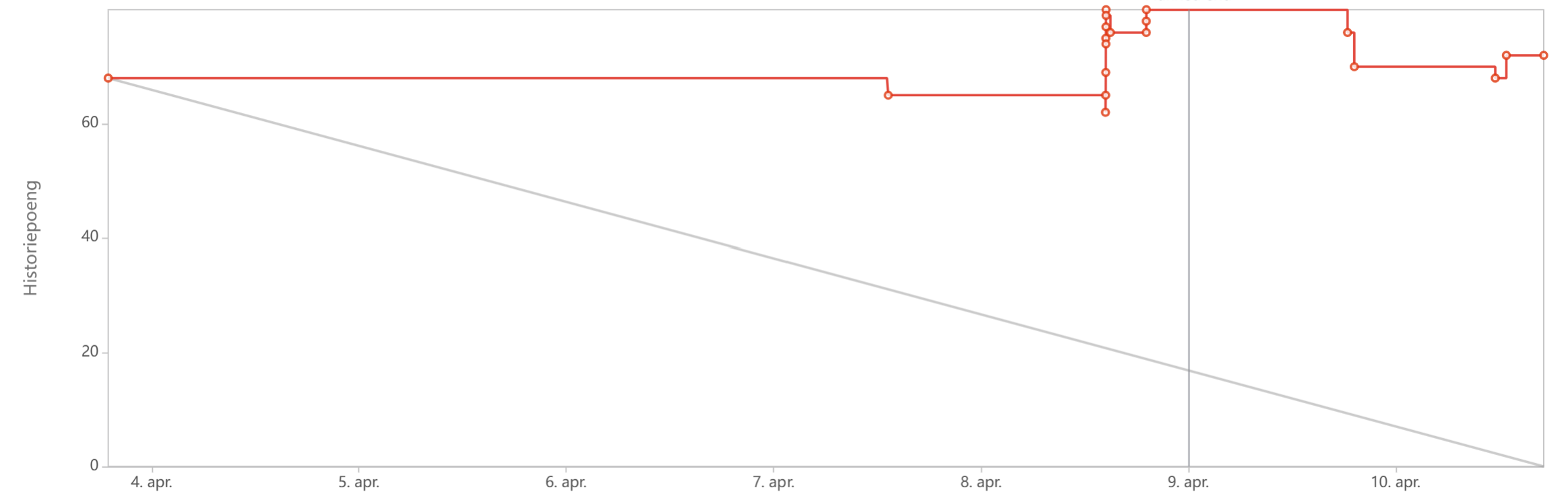
The sprint started with approximately 67 story points. The remaining workload stayed unchanged at around 67 story points until 7 April, indicating little progress during the first half of the sprint. On 8 April, the points decreased slightly to approximately 64 story points as some tasks were completed. However, additional tasks were added or re-estimated on 8–9 April, increasing the points to a peak of approximately 75 story points. By the end of the sprint on 10 April, approximately 71 story points remained. The low completion rate was primarily caused by the Easter holidays and an overestimation of the team's available capacity, resulting in less than half of the planned work being completed.
3.10.6 Sixth sprint
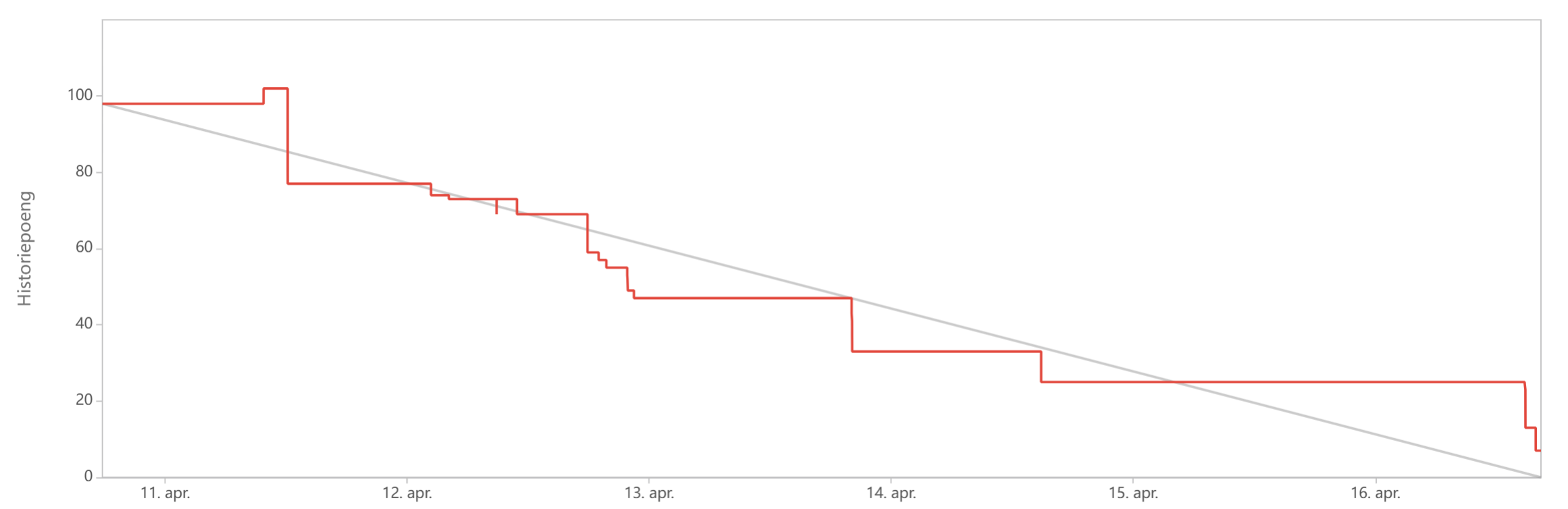
The sprint started with approximately 98 story points. On 11 April, the total number of story points briefly increased to around 102 as additional work was added. Throughout 12 and 13 April, the team completed several tasks, reducing the remaining work from approximately 77 to 47 story points. Further progress was made on 14 April, bringing the remaining work down to approximately 33 story points, and by 15 April it had decreased to around 25 story points. The sprint ended on 16 April with approximately 7 story points remaining, meaning that the vast majority of the planned work was completed. This aligns with the sprint outcome, where 31 out of 32 tasks were completed and only one task was carried over to the next sprint.
3.10.7 Seventh sprint
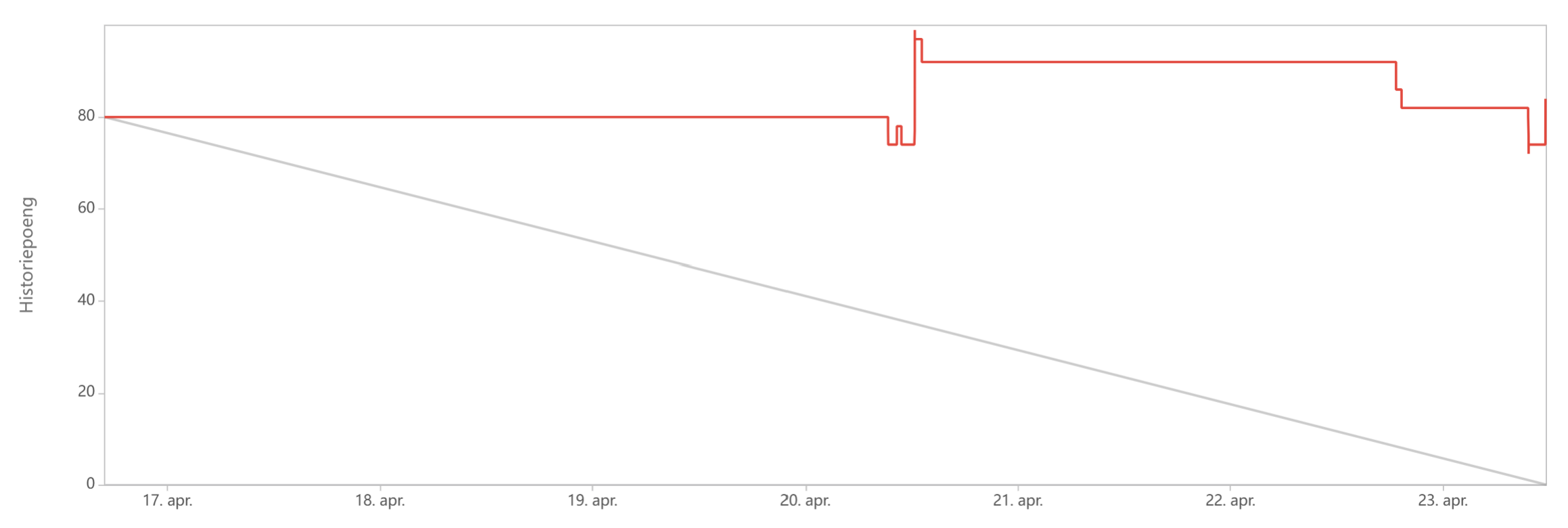
The sprint started with approximately 80 story points. Little progress was made during the first four days, as the remaining work stayed close to 80 story points until 20 April. On 20 April, the number of story points briefly decreased to approximately 75, but additional tasks or re-estimations increased the total to a peak of around 95 story points later the same day. The remaining work then stayed relatively stable until 22 April, before decreasing to approximately 73 story points on 23 April as several tasks were completed. Despite this progress, the sprint ended with a large number of remaining story points, indicating that only around half of the planned work was completed.
The limited progress was mainly caused by the team's underestimation of the learning curve associated with new software tools, particularly SolidWorks and Flutter. Since the sprint focused heavily on programming and 3D modelling, many tasks depended on team members with specialized knowledge. With only one app developer and one team member having access to SolidWorks, the workload was distributed unevenly, creating bottlenecks that affected task completion. The team discussed this challenge during the retrospective and concluded that the task allocation was necessary due to project deadlines, personal schedules, and anticipated member unavailability in future sprints.
3.10.8 Eighth sprint
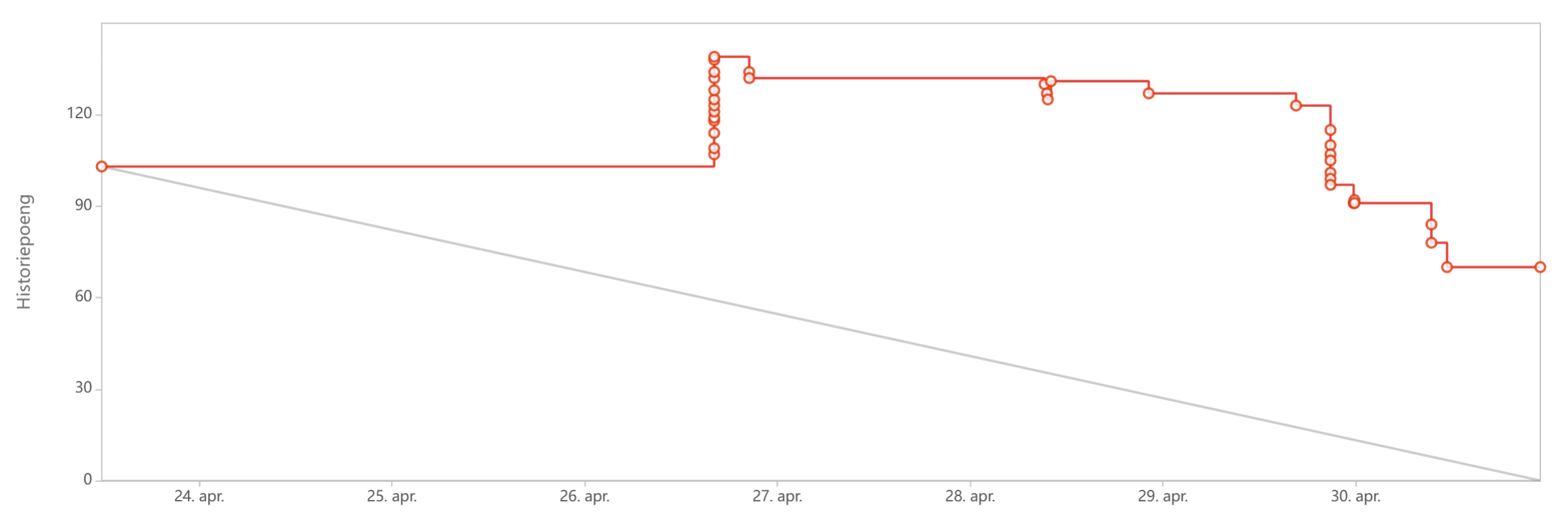
The sprint started with approximately 102 story points. The remaining work stayed unchanged until 26 April, when the total number of story points increased significantly to a peak of approximately 136. Not only were tasks added, but story points that had not been added to the start of the sprint is added later on causing the chart to peak. Between 27 and 29 April, little progress was made, with the remaining work staying above 120 story points. Towards the end of the sprint on 30 April, several tasks were completed, reducing the remaining work from approximately 121 to 69 story points. Despite this progress, the sprint ended with a substantial number of remaining story points, indicating that a significant portion of the planned work was not completed.
3.10.9 Ninth sprint
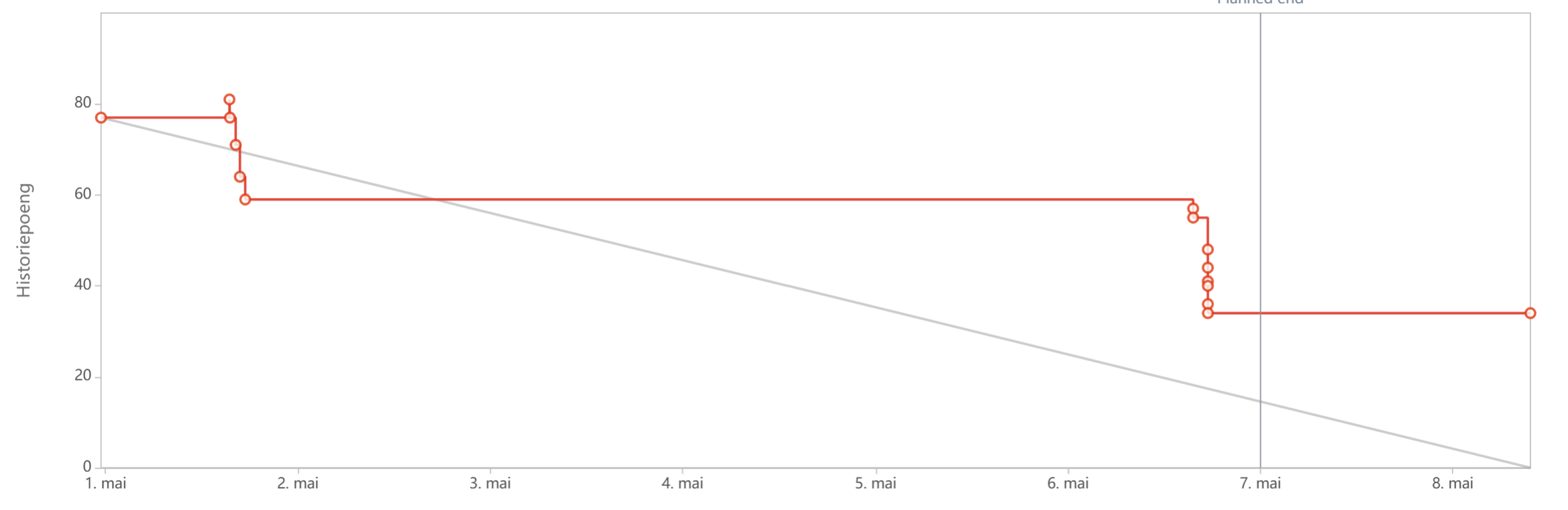
The sprint started with approximately 77 story points. Early in the sprint, the remaining work decreased to approximately 58 story points on 1 May. The number of remaining story points then stayed stable until 6 May, when additional progress reduced it to approximately 34 story points. No major changes occurred during the final days of the sprint, and the sprint ended with approximately 34 story points remaining. Compared to previous sprints, the chart shows a more consistent reduction in remaining work and a lower number of unfinished story points.
3.10.10 Tenth sprint
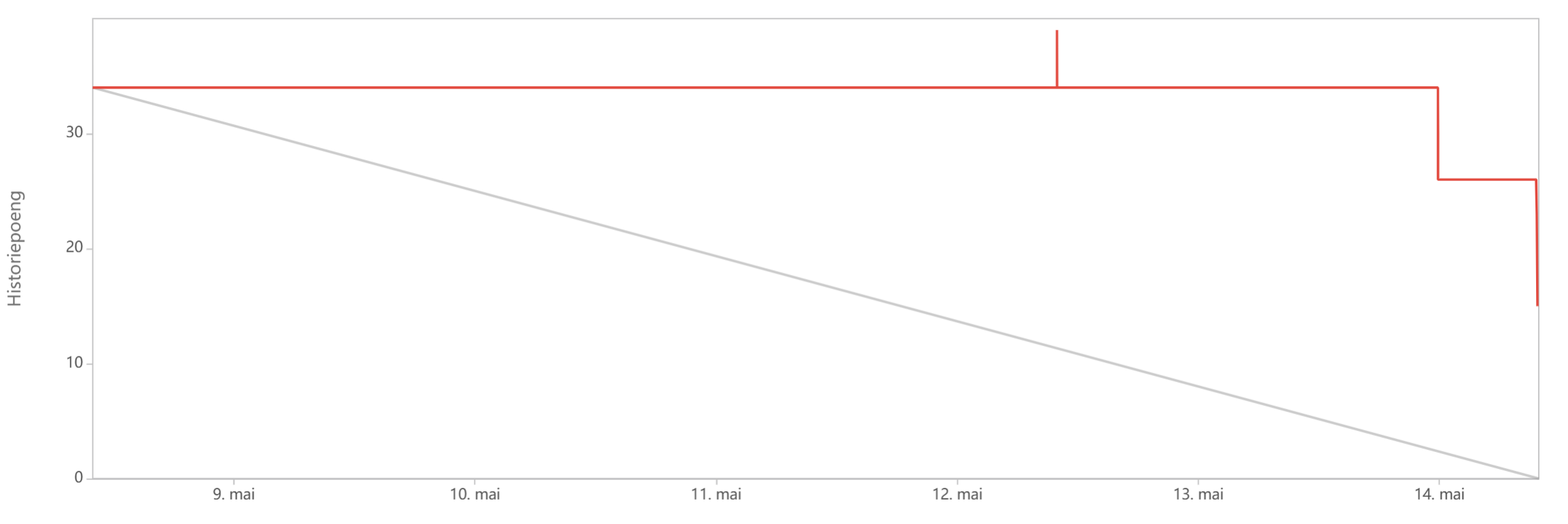
The sprint started with approximately 34 story points. The remaining work stayed unchanged for most of the sprint, indicating limited task completion during the first several days. Around 12 May, the total number of story points briefly increased to approximately 38 before returning to its previous level. On 14 May, several tasks were completed, reducing the remaining work first to approximately 26 story points and then to approximately 15 story points by the end of the sprint. Although progress was concentrated towards the end of the sprint, more than half of the initial story points were completed.
3.10.11 Eleventh sprint
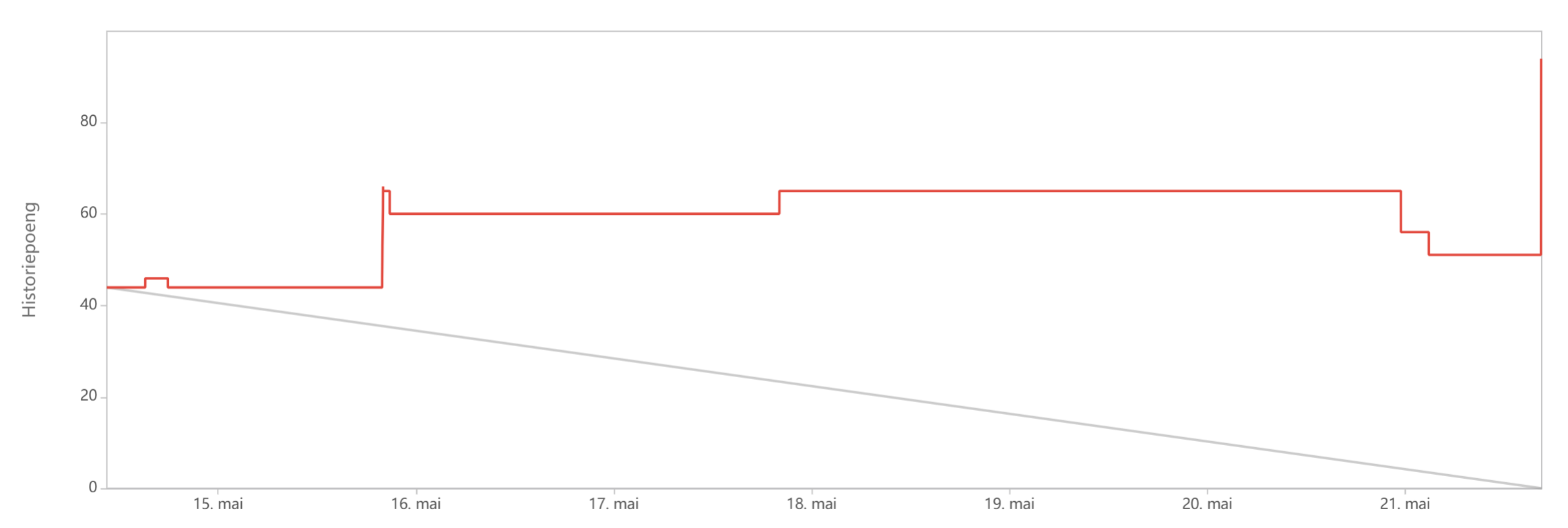
The sprint started with 44 story points. During the first two days, the number of story points increased to approximately 60 and later to 65, indicating that additional work was added to the sprint. The remaining work then stayed relatively stable until 21 May. Towards the end of the sprint, several tasks were completed, reducing the remaining work to approximately 50 story points. However, a substantial increase occurred on the final day, causing the sprint to end with approximately 92 story points. As a result, the sprint finished with considerably more story points than it started with, reflecting significant additions or re-estimations of work during the sprint.
3.10.12 Twelfth sprint
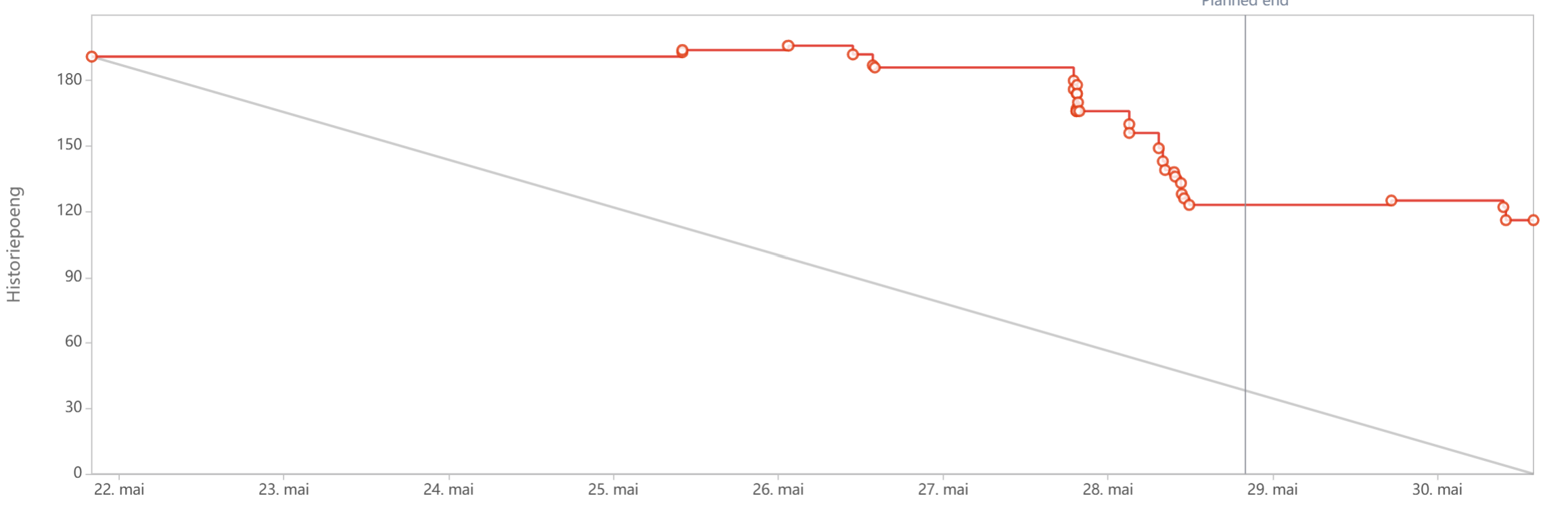
The sprint started with 191 story points. The remaining work stayed close to this value until 27 May, when several tasks were completed, reducing it to approximately 165 story points. Significant progress was made on 28 May, as the remaining work decreased further through a series of completed tasks, reaching approximately 122 story points. The number of remaining story points then remained relatively stable for the rest of the sprint, with only minor fluctuations. The sprint ended on 30 May with approximately 116 story points remaining, representing a reduction of about 75 story points from the start of the sprint.
3.10.13 Thirteenth sprint
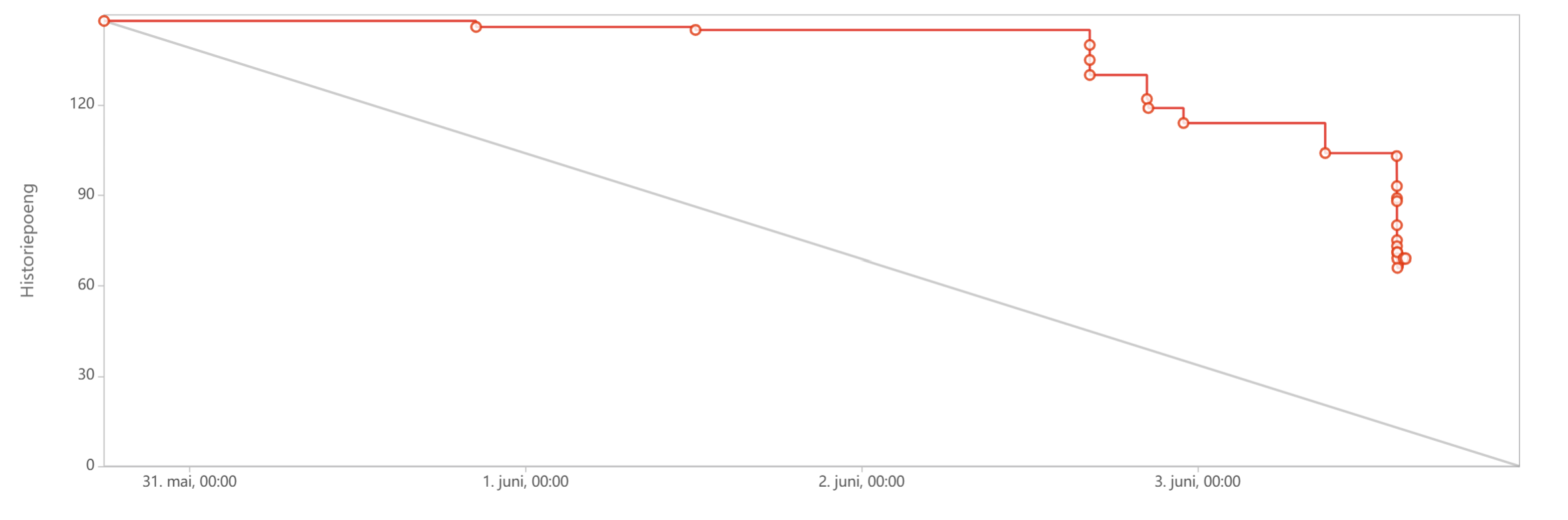
The sprint started with 148 story points. The remaining work decreased slightly to approximately 146 story points on 1 June and remained largely unchanged until 2 June. Later on 2 June, several tasks were completed, reducing the remaining work to approximately 126 story points and subsequently to around 114 story points. Additional progress was made on 3 June, when the remaining work decreased further to approximately 104 story points. Towards the end of the sprint, a large number of tasks were completed in quick succession, reducing the remaining work to approximately 66 story points. This represents a total reduction of around 82 story points during the sprint and marks one of the most substantial decreases in remaining work achieved within a single sprint.
3.10.14 Fourteenth sprint
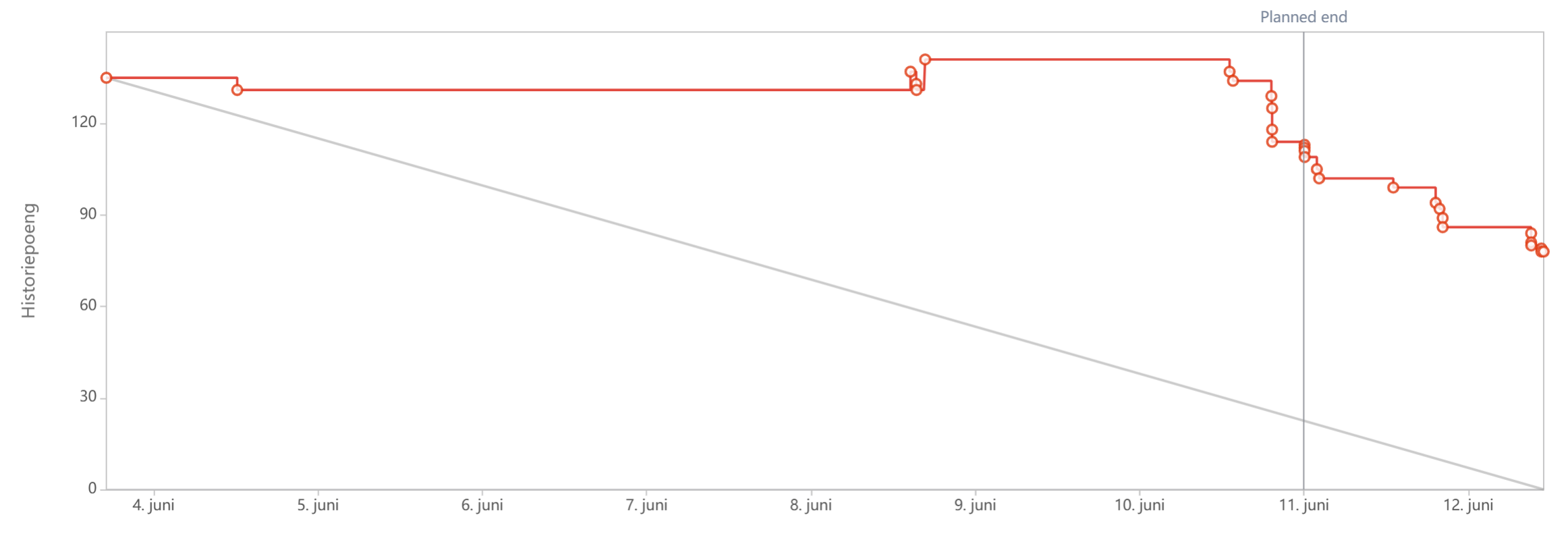
The sprint started on 4 June with approximately 135 story points. During the first half of the sprint, little progress was recorded, and the remaining work stayed close to 130 story points. On 8 June, the number of story points briefly increased to approximately 142, indicating that additional tasks were added or existing work was re-estimated. Progress accelerated during the final days of the sprint, with the remaining work decreasing steadily from approximately 135 story points to around 78 story points by the end of the sprint. The sprint was originally planned to end on 11 June; however, the deadline was extended by one day to allow additional work to be completed before the final deliverables. Despite the extension, the sprint ended with a considerable number of remaining story points. This reflects the intensive nature of the final project phase, where development, testing, documentation, report writing, and preparation of final deliverables were carried out simultaneously. Nevertheless, the sprint achieved a reduction of approximately 57 story points and contributed significantly to preparing the project for final submission
3.11 Retrospective
3.11.1 Research and project definition phase (Sprints 1-3)
The first phase of the project was characterized by uncertainty regarding the project scope and concept. The team's initial project idea was rejected because it was considered too broad, forcing the team to quickly redefine the project direction. As a result, a significant amount of time was spent researching smart farming, basil cultivation, productivity, motivation, and the relationship between plants and well-being.
During this phase, the team identified several communication issues. In one supervision meeting, undiscussed app-related topics were presented, resulting in unconfirmed information being communicated to the teachers. The team also discovered that parts of the Wiki lacked sufficient detail and that some deliverables required additional work before submission. Furthermore, task assignments were often delayed, communication was inconsistent, and tasks were not weighted or prioritized, making workload distribution difficult.
Despite these challenges, the phase ended positively. Communication improved significantly, approximately 90% of the sprint tasks were completed, and the team established a shared understanding of the Screen2Green concept. By the end of Sprint 3, the project scope was clearly defined, deliverables had been brought up to date, and the team had introduced task weighting and prioritization to improve future sprint planning.
3.11.2 Development preparation and interim delivery (Sprints 4-6)
The second phase focused on transitioning from research to development while simultaneously preparing the interim report and presentation. Although communication and engagement improved compared to earlier sprints, Sprint 4 highlighted weaknesses in sprint planning. The sprint period was shorter than usual, several team members were unavailable, and only around 60% of the planned tasks were completed. App development was also delayed because the team member responsible for development was unavailable during the sprint.
Sprint 5 was heavily affected by the Easter holidays. The team overestimated its available capacity, resulting in less than half of the planned work being completed. The burndown chart showed that the number of remaining story points actually increased during the sprint as new tasks were added and existing work was re-estimated.
The situation improved considerably during Sprint 6. The team successfully delivered the interim report and presentation, receiving largely positive feedback and minimal criticism. Almost all sprint tasks were completed, and the burndown chart showed a reduction from approximately 98 story points to only 7 remaining story points. However, the retrospective also revealed that some team members arrived unprepared to meetings and that engagement varied across the group. Overall, this phase demonstrated substantial improvement in both communication and execution compared to earlier sprints.
3.11.3 Development, integration, and finalization phase (Sprint 7-14)
The final phase of the project focused on application development, 3D modelling, electronics integration, testing, and completion of the final deliverables. A recurring challenge throughout Sprints 7 and 8 was the uneven distribution of technical tasks. The team underestimated the learning curve associated with Flutter, Supabase, and SolidWorks, and many critical tasks depended on a small number of team members with specialized knowledge. This created bottlenecks and contributed to lower-than-expected sprint completion rates.
During Sprints 9 and 10, the team's performance improved. Tasks were completed earlier, delegation became fairer, and sprint outcomes became more predictable. Nevertheless, communication issues persisted, particularly when team members failed to provide status updates or when dependent tasks could not begin because prerequisite work had not been shared. The team therefore emphasized more frequent progress updates and clearer communication regarding task completion.
The final sprints introduced additional challenges. In Sprint 11, illness affected key development activities and delayed planned testing, particularly for the software components of the project. Despite this setback, the team managed to recover during Sprints 12 and 13. Large numbers of development, testing, documentation, and deliverable-related tasks were completed, resulting in some of the largest reductions in remaining story points observed throughout the project.
Sprint 14 served as the final sprint before the completion of the project deliverables. During this sprint, the team focused on finalizing documentation, completing outstanding development and testing tasks, refining the prototype, and preparing the final report and presentation materials. Although the sprint was originally planned to end on 11 June, an additional day was required due to the remaining workload and approaching deadlines. The sprint achieved a substantial reduction in remaining story points, but a number of tasks still remained to be completed. As the project approached its final submission, the team recognized that an additional sprint was necessary to finalize the remaining deliverables and complete the last refinements. Nevertheless, by the end of Sprint 14, the majority of the development work had been completed, and the project had entered its final delivery phase.
3.11.4 Velocity chart
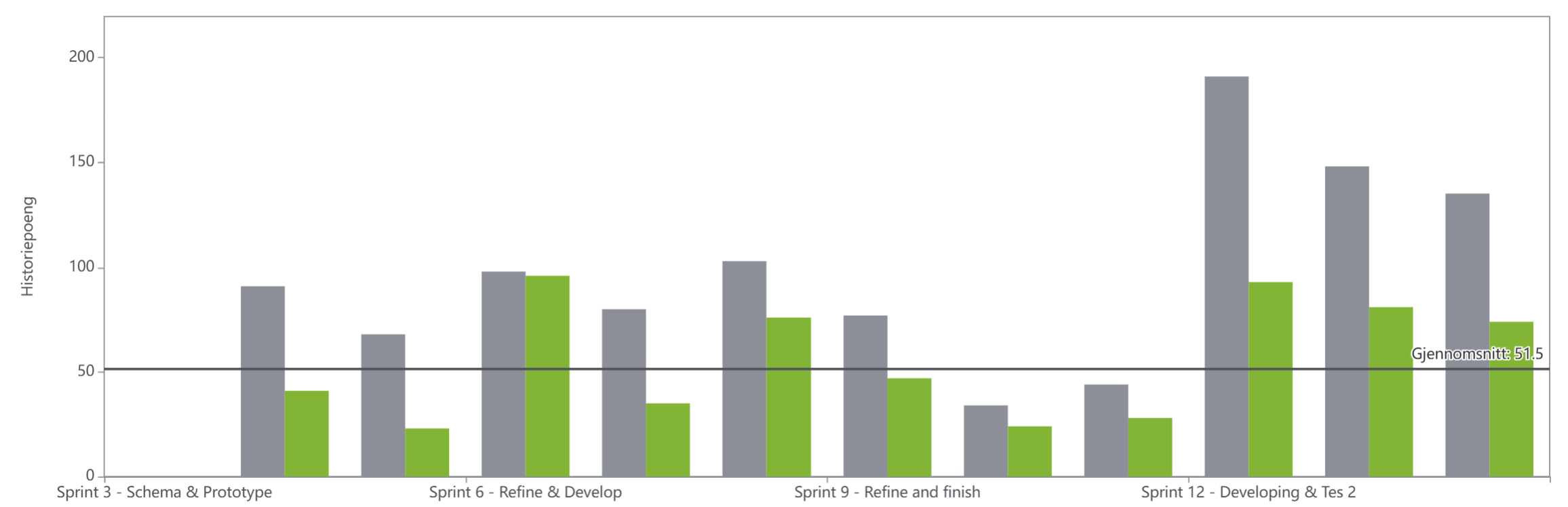
Figure 14 presents the velocity chart for the project. The grey bars represent the total number of story points planned for each sprint, while the green bars represent the number of story points completed. The chart shows that the team consistently completed fewer story points than initially planned, indicating a recurring tendency to overestimate sprint capacity throughout the project.
Several factors contributed to this pattern. One of the main reasons was that unfinished tasks were regularly carried over into subsequent sprints. As a result, new sprint commitments were often added on top of existing unfinished work, causing the planned workload to gradually increase over time. At the same time, the team remained optimistic about its ability to catch up on delayed tasks, which often resulted in ambitious sprint plans that proved difficult to complete within the available time. Another contributing factor was the difficulty of estimating the effort required for technical tasks. Throughout the development phase, the team underestimated the learning curve associated with new technologies. Several tasks also turned out to be more complex than initially expected, requiring additional iterations, debugging, testing, and integration work. Furthermore, some activities depended on specific team members with specialized knowledge, creating bottlenecks that affected overall sprint progress.
The chart also reflects fluctuations in team availability due to holidays, illness, academic deadlines, and other commitments. These factors reduced the amount of time available for project work and made accurate workload estimation challenging. As a result, the average completed velocity stabilized at approximately 51.5 story points, even though the planned velocity was frequently much higher. Despite the recurring gap between planned and completed work, the chart demonstrates gradual improvement in the team's understanding of its actual capacity. Sprints 6, 9, and 10 show relatively small differences between planned and completed story points, indicating more realistic planning and effective execution. In contrast, the largest gaps occurred during the later sprints, particularly Sprints 11–14, where the planned workload increased significantly. This suggests that a combination of postponed tasks, increasing technical complexity, and the pressure of approaching deliverables led to an accumulation of work towards the end of the project.
Overall, the velocity chart highlights the importance of realistic workload estimation and capacity planning. The team's experience showed that optimistic planning, combined with task carryover and increasing project complexity, can result in a growing gap between planned and completed work. One of the key lessons learned was the importance of identifying the team's sustainable working capacity as early as possible. Had the team established a more reliable average velocity earlier in the project, sprint planning could have been based more consistently around that level rather than on optimistic assumptions. However, maintaining a stable velocity was particularly challenging in this project because the nature of the work changed significantly over time. Some sprints focused primarily on research and documentation, while others involved software development, 3D modelling, testing, presentations, and major deliverables with fixed deadlines. These activities varied considerably in complexity, uncertainty, and dependency on specific team members, making accurate estimation difficult even when the team's average capacity became more apparent. As a result, sprint planning required balancing known team capacity against project milestones and mandatory deliverables, which occasionally led to workloads that exceeded what could realistically be completed within a single sprint.
3.12 Summary
This chapter presented the project management activities used throughout the development of Screen2Green. The project was planned and managed through defined scope, stakeholder analysis, scheduling, cost management, quality management, risk management, backlog management, and iterative sprint execution. The sprint outcomes, retrospectives, burndown charts, and velocity analysis showed how the project progressed from research and concept development to implementation, testing, and final delivery. Although workload estimation and sprint planning were not always accurate, the team continuously adapted its processes and improved coordination throughout the project.
Overall, the project management approach provided the structure necessary to organize the work, monitor progress, and successfully deliver the Screen2Green prototype within the project's constraints. Based on this, the next chapter focuses on the marketing plan, where the product is analyzed in terms of market potential, target users, and strategic positioning.