This is an old revision of the document!
8. Software
8.1 Application choices
As mentioned earlier in the report, this project has an application that's used with the plant pot. It's used to monitor the metrics of the plant pot, to guide the user to increased productivity and to keep track of the evolution of both. At the time of writing, the application is only developed for usage on Android smartphones with ideas for increasing the app market. This application is written in Flutter and uses a Supabase backend for storing data and handling authentication.
8.2 Software choices
The application is split in a self written front-end and a cloud-based back-end. There are several reasons behind why the team chose to use a cloud-based back-end instead of writing their own.
- Time management: Without the need for writing a custom back-end solution, the developer could put more focus into the front-end's logic and UI.
- No hosting: A cloud-based back-end is already online, meaning the team doesn't need to handle hosting costs. Secondly, the team doesn't need to manage that hosting, allowing further focus on the front-end.
- Ease of use: Cloud-based back-end solutions offer tools to make the back-end workflow easy. These include tools to build tables, querying tools, policy assignment tools and many more.
8.2.1 Front-end
The front-end is written in Flutter, an open source programming framework designed by Google and written in Dart. The widgets are split into multiple components following atomic design. By using atomic design, the developer can make big changes throughout the application by making macro changes. This also allows for categorization of widgets per function and size [1]. Both of these allow for faster workflow and separation of concern.
As mentioned in the previous chapter, the developer of the team went through a careful process of of continuous user testing and wireframe development in order to create a design that matched the purpose as well as a design that was accessible.
To attain both goals, the developer used the following apps for design reference:
- Forest, an application that aims to help its users increase their productivity by growing a virtual forest.
- Minimalist phone, an overhaul of the user's phone by removing all applications off the home screen and displaying a minimal amount of necessary widgets (e.g. the current time) to decrease the amount of distractions.
- Liven, a mental health application designed to increase in the user's relaxation and levels of serenity.
8.2.1.1 UI
The wireframe was made with high-fidelity in mind, meaning it had its own housestyle before the final decision on housestyle for the eventual application. Because of this, the final product looks a bit different from what was shown during user testing. However, the main concepts stayed the same, being the colors, positioning of elements and edge design.
One notable design is the usage of simple icons which fit more into the design of the background and show less details, meaning the user's brain is more calm when processing the information [2]. Figure 1 is a perfect example of these changes. This is the first page the user sees after authentication, the plant connection page. As shown below, the page in the final product looks simpler in design and shows less information.

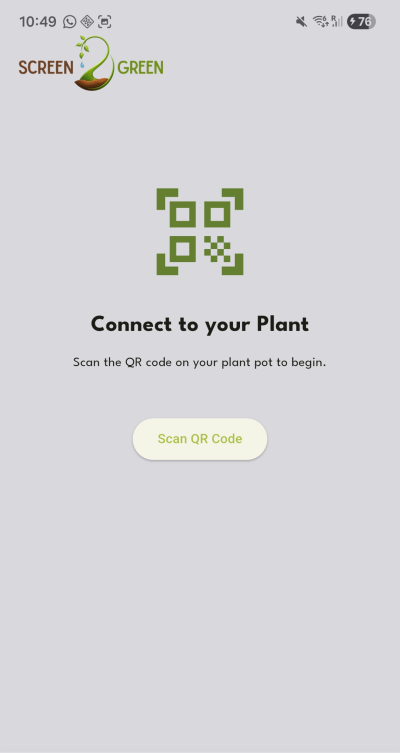
Secondly, the settings icon isn't displayed anymore in the top right corner of the application. This can also be seen on figure 1 and is applied to every page. Initially, there was an idea to keep that settings icon for the user to change their settings without needing to go to the profile page. This icon was removed with the idea in mind that it could potentially distract the user from each page's purpose. Secondly, 95% of users don't change any settings in apps or websites and stick to the default options [3]. This space is now empy and could be user for other content, for example warning messages or in-app pop-up notifications. While the usage for this empty space is undecided, the space will simply stay empty.
8.2.1.2 Logics
The original idea was for this application to be written in Ionic Vue JavaScript, but due to its taxing amount of energy on smaller devices that idea was quickly scrapped. The app is thus written in Flutter.
The app is written following the logics of atomic design and dumb components. Dumb components are presentational components, this means they're written with little amounts of logic to no logic at all. The parent widgets include all the logic [4]. This approach allows for quick reusability of these low-level components, also known as widgets in Flutter.
Since this application relies heavily on back-end functionality, of which there is more information in the back-end subchapter below, every page widget contains logics to retrieve data from the database. Before this, the application needs to connect to the back-end using the right credentials. This happens in the root file of the project, being main.dart. Since the back-end solution is Supabase, the front-end requires the supabase_flutter package to connect to it.
import 'package:supabase_flutter/supabase_flutter.dart';

Future<void> main() async {
  WidgetsFlutterBinding.ensureInitialized();
  await Supabase.initialize(
    url: 'URL of the supabase back-end',
    anonKey: 'anonymous supabase database key',
  );
  runApp(MainApp());
}
TO retrieve the data per page, the logic performs a simple retrieval of data on app start-up. The data gets retrieved in the state block of each page widget.
void _refreshPosts() {
    final supabase = Supabase.instance.client;
    setState(() {
      _postsFuture = supabase
          .from('social_media_posts')
          .select('''
            id,
            created_at,
            description,
            thumbnail,
            users:author_id (
              first_name
            )
          ''')
          .order('created_at', ascending: false);
    });
  }
The exception lies in the plant overview page. This page's intention is to show a live stream of the data that the plant pot's temperature sensor and soil moisture sensor pick up. This means that a data retrieval on page load won't suffice, as this won't update live. Luckily, Supabase allows for tables to be reactive, meaning devices can subscribe to that table and get live changes. This is called realtime functionality [5]. In the code, instead of a query into a future object, the data gets stored into a Supabase stream object. With this code, the device is subscribed to the live table and will follow its changes. Again, this retrieval happens in the page's state widget.
void _startStream() {
    _plantStream = Supabase.instance.client
        .from('plant_pots')
        .stream(primaryKey: ['id'])
        .eq('device_id', 'testforEPS26')
        .map(
          (rows) => rows
              .map(
                (r) => {
                  'id': r['id'],
                  'moisture': r['moisture'],
                  'temperature': r['temperature'],
                  'water': r['water'],
                  'water_pass_through': r['water_pass_through'],
                  'relay_command': r['relay_command'],
                },
              )
              .toList(),
        );
  }
9. Conclusions
9.1 Achievements
The primary objective of the Screen2Green project was to develop a prototype concept that links smartphone usage to plant care in order to promote awareness of excessive screen time and encourage healthier digital habits. During the project, a complete system concept was developed, including the mechanical design, electronic architecture, mobile application, and irrigation strategy. Research into digital wellbeing, hydroponics, plant growth, and smart farming technologies provided the foundation for the design decisions made throughout the project. The project successfully established the framework for integrating smartphone screen-time monitoring with plant care. Initial hardware and software development demonstrated communication between the system components and provided the basis for the intended behavioral feedback mechanism.
The project also provided valuable engineering insights through practical testing and component validation. During prototype testing, it was discovered that the selected solenoid valve required a higher operating pressure than could be provided by the original gravity-fed irrigation setup. To overcome this limitation and continue development, the prototype was adapted to use a water pump-based irrigation system. This finding highlighted an important limitation of the chosen prototype components rather than the overall product concept. Further investigation identified alternative low-pressure valve solutions that are more suitable for the intended final product design. Although these alternative components could not be procured and tested within the project timeframe, their identification provides a clear path for future implementation and validation. As a result, the irrigation solution intended for the final product could not be fully validated within the project timeframe. Nevertheless, the project successfully developed and evaluated the overall concept, demonstrated the feasibility of linking smartphone usage to plant care, and identified key technical challenges together with promising solutions for future development.
9.2 Limitations
The project was limited by the available development and testing period. Consequently, long-term evaluation of plant growth and user behavior was not possible. The concept demonstrates the feasibility of linking smartphone usage to plant care, but does not provide sufficient data to assess its long-term impact on screen-time reduction. In addition, the system was primarily developed with basil as the target plant. The performance of the concept with other plant species remains unknown and would require further investigation.
A significant limitation identified during the final stages of development was related to the irrigation system. Testing revealed that the selected solenoid valve required a higher water pressure than could be provided by the original gravity-fed irrigation concept. This discovery required a redesign of the irrigation system and delayed the assembly and validation of the final prototype. Another limitation identified during testing was the heat generated by the solenoid valve. The current prototype design is based on a PLA housing, whereas the intended final product incorporates cork as the primary structural material. Since the thermal behaviour of these materials differs, the long-term effects of heat generation on the final design could not be evaluated. Furthermore, the redesign of the irrigation system may require additional modifications to the internal layout and overall product architecture.
9.3 Future Development
Future work should focus on integrating and testing the identified low-pressure valve solution within the final product architecture. The water pump-based solution implemented during prototype development served as a practical workaround to continue testing and validation activities. However, the intended final product aims to maintain the original gravity-fed irrigation concept by utilizing a low-pressure valve that can operate without additional pumping. Preliminary analysis suggests that the replacement valve will overcome the pressure limitations encountered during prototype testing and enable the intended irrigation strategy. Experimental validation is nevertheless required to confirm system reliability, water delivery performance, and long-term operation. Additional testing using the intended cork-based housing is also recommended. This would allow evaluation of thermal behavior, moisture resistance, structural durability, and overall product performance under realistic operating conditions. Such testing would provide valuable insights into the interaction between the irrigation system, electronic components, and sustainable construction materials.
Future work should also focus on optimizing the growing medium. During the project, sodium alginate and polyacrylamide were identified as promising materials for improving water retention and moisture distribution. Further experimentation should be conducted to determine the optimal mixture and porosity for supporting healthy plant growth and efficient water management. Future versions of Screen2Green could support a wider variety of plants and include additional environmental sensors for monitoring factors such as temperature, humidity, and water levels. Improvements to the mobile application, including enhanced user feedback, usage analytics, and personalization features, could further strengthen the connection between digital habits and plant care.
Finally, a long-term user study should be conducted to evaluate the effectiveness of the biological feedback mechanism and determine whether the system contributes to lasting changes in smartphone usage behavior. Such a study would provide valuable insight into the long-term impact of the concept and help validate its effectiveness as a tool for promoting digital wellbeing.